
Why most fitness apps ask you to sign up
An account usually exists because the app keeps your data on its own servers. That makes several things easy for the company: syncing your phone with a website, tying a subscription to you, sending you emails, and building a picture of how you use the app. Some of that is genuinely useful to you. Some of it is mostly useful to them.
A gym log has a small core job. You need a plan, a quick way to record weight and reps, and a way to see whether the numbers are going up. None of that needs a server.
What you give up without an account
It's worth being honest about the trade-offs before you commit:
- No automatic sync. Your log lives on one phone. If you want it on a tablet as well, there's no account to sync it through.
- No web dashboard. You can't sign in on a laptop to look at your charts.
- No social features. There's no feed and no friends list, and no way to share workouts inside the app.
- Backups are your job. No company keeps a copy for you, so you save one yourself (more on that below).
If those matter a lot to you, an account-based app may suit you better. For people who train on their own and use one phone, they rarely come up.
What you get instead
- You start straight away. You can be logging sets within a minute of installing.
- There's no password to forget or leak. Without a login, there's nothing for anyone to steal.
- Your inbox stays quiet. The app doesn't have your address, so it can't email you.
- Nobody else holds your history. Your body weight, training days and lifts stay on your device.
- It works offline. With no server to talk to, logging never waits for signal. Our guide to the offline workout tracker explains why that matters in a basement gym.
How backups work when there's no account
This is the part people worry about, so here's exactly how it works in Mooskles.
Export backup in Settings saves your whole logbook into one file. You decide where it goes: a files app, a cloud drive, or an email to yourself. On a new phone, Import backup loads that file and every rep comes with you. Importing replaces whatever is already on that phone, so do it before you start logging on the new one.
Export CSV does a different job. It writes one row per logged set for use in a spreadsheet, and it can't be imported back. Use the CSV for analysis and the backup for moving phones.
On Android, if you have Google's device backup switched on, the system may also include the app's data in your personal Google backup. That backup belongs to your Google account, and we can't access it. Treat it as a bonus, and keep your own exported backup as the copy you rely on.
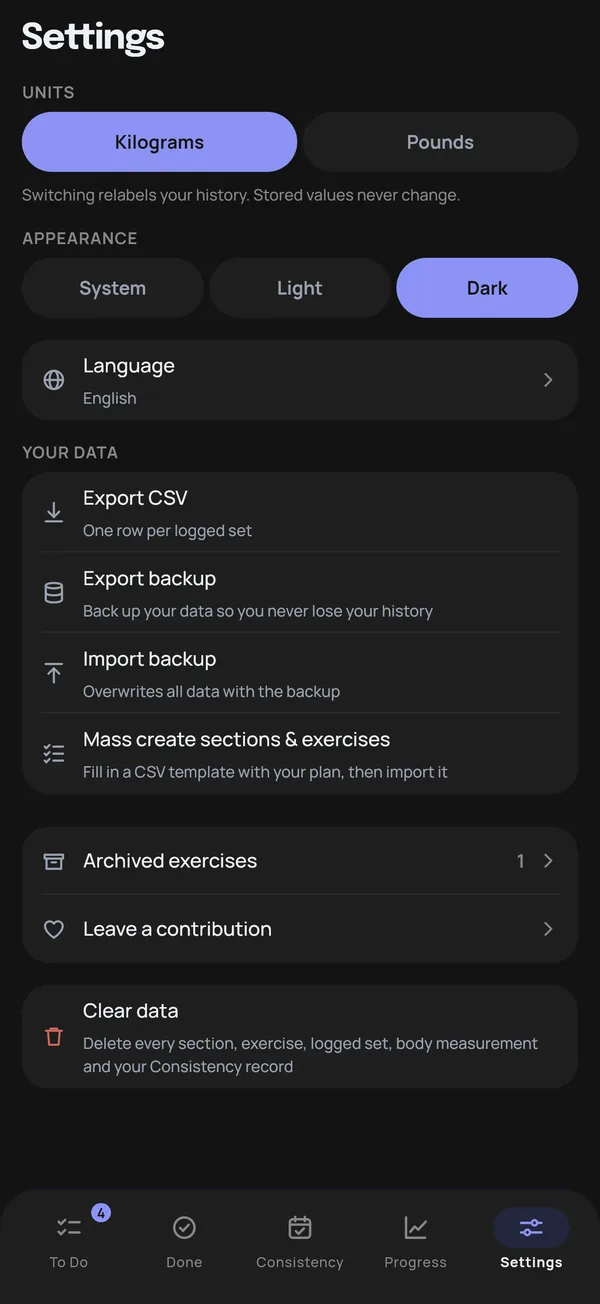
A good habit is to export a backup once a month, and always before you reset or replace your phone. Save it somewhere that isn't the phone itself.
What if you lose your phone?
Without an account, your log is only as safe as your last backup. If the phone is lost and you never exported, the history goes with it. If you exported last month, you lose at most a month of sets: install the app on the new phone, import the file and carry on.
That's the real cost of keeping your data off a server, and it's worth knowing up front. A monthly export, with a calendar reminder so you don't have to remember it, covers it.
How to tell if an app really needs no account
"No account required" sometimes means "no account required yet". Before you put months of training into an app, check these five things:
- Can you log for a week without a sign-in prompt? Opening the app isn't enough. Use it properly for a few sessions.
- Does it work in airplane mode? If logging fails offline, your sets are going to a server.
- What does the store say about data? On Google Play, the Data safety section lists what an app collects and what it shares.
- Can you export your data? An app that keeps everything on your phone should give you a way to take it with you.
- Are the charts and history behind a paywall? Some apps skip the account but lock the useful parts. Our guide to free workout apps with no ads covers what to look for.
What Mooskles does and doesn't send
Your workouts never leave your phone unless you export them yourself. There are no analytics, no crash reports and no advertising ID. The app makes one kind of network request: when it starts, it asks our payment provider, RevenueCat, for the prices of the optional tip in Settings. That request carries a random app ID and basic device details such as the OS version. It never includes your training data. The privacy policy lists every detail.
Mooskles is on Google Play now, in 13 languages, and the iPhone and iPad version is on its way.
Mooskles opens straight to your workouts and keeps your whole log on your phone. Free, offline, no account, no ads.
Get Mooskles